A correction you can check
This worksheet keeps the paper size fixed while the measured correction factor scales the cursive name, handwriting guides, and verification ruler together.
The calibration sheet always prints an uncorrected horizontal ruler, so a previous correction cannot silently enter the next measurement.
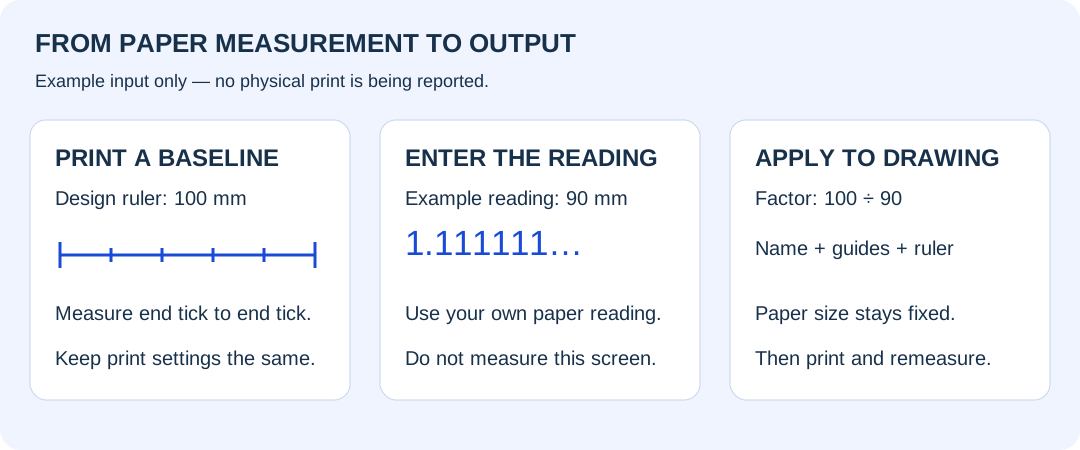
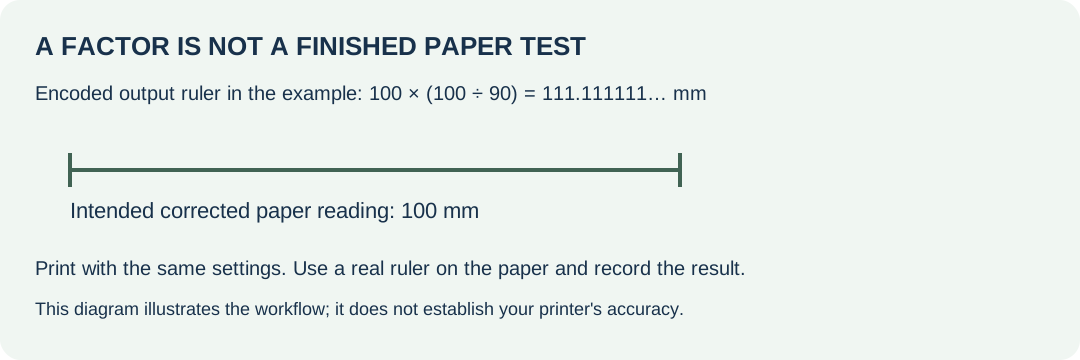
Print the corrected worksheet and measure its verification ruler again. The intended paper length remains 100 mm. A displayed factor alone does not establish a physical result.
What changes, and what stays fixed
A corrected sheet is blocked when its scaled writing area crosses the safe margin, rather than being automatically shrunk back to fit.
The exported SVG stores the cursive name as drawn outlines and includes the same corrected ruler that appears in the on-page preview.
Changing paper size clears the measurement because a value recorded for one print setup should not be silently reused for another.
Reading this worksheet's correction
The preview reports the ruler length encoded in the SVG before printer scaling, while its ruler label describes the intended length on the final paper.
Reset calibration removes the entered measurement and redraws the name, practice guides, and output ruler at their original uncorrected size without changing the chosen name.
The worksheet print button uses a copy of the preview drawing, while the baseline print button deliberately substitutes the separate uncorrected measurement sheet.
Before you call it calibrated
Measure from tick to tick horizontally. If vertical dimensions distort differently, this single-factor correction cannot repair that printer behaviour. Preview zoom is not a physical ruler. Recheck after changing print settings.
Cursive outlines are a font model, not verified stroke-order instruction or a learning assessment. The tool does not measure a child's handwriting or predict progress.
Owner's print-test notes
[OWNER TO ADD: printer model, paper, print settings, baseline measurement and corrected measurement after a real paper test.]
Teaching writing names: where should we begin?
Give the name a purpose, such as signing a drawing or taking part in a sign-in routine. Show a model and welcome the child's own attempt, including a first letter or letter-like marks. Use a print model when that matches their current classroom practice; this cursive generator is not a preschool readiness test. See the name writing practice activities for ideas beyond tracing.